
Content automation helps teams assemble initial drafts quickly, but turning raw text into an article an editor can approve remains difficult. When you lead a startup or run a lean editorial team, generating copy is rarely the main obstacle. Software produces paragraphs on demand, yet those drafts often lack context, lean on unsupported assertions, or miss your house voice. The core problem is verifying claims, organising structure, and checking that every section meets editorial standards before publication.
This guide shows founders and small editorial teams how to build a practical, AI-assisted publishing pipeline. I examine an eight-stage production workflow, showing where software assists with research and drafting, and where you must intervene as an editor to review sources, refine tone, and format the final piece.
Key takeaways
- Ground your production in structured content components so you can update central assets across multiple channels without rewriting entire articles (Sanity; Sanity).
- Verify every technical assertion against primary source documents, as source metadata mappings offer attribution rather than independent proof (Google Cloud).
- Separate your production pipeline into eight distinct stages with required human decisions before advancing to the next step.
- Inspect page titles, meta descriptions, and image alt text manually to satisfy search guidelines and accessibility standards (W3C WAI; Google Search Central; Google Search Central).
- Test your editorial workflow on a single article to log every manual edit before attempting to scale production.
Developing a pragmatic content automation strategy
A pragmatic content automation strategy treats editorial production as an assembly of distinct, structured assets rather than an unguided text generator. Many teams confuse editorial workflows with general marketing automation. Where marketing automation focuses on message delivery, and social media automation manages distribution queues, editorial automation focuses on researching, drafting, structuring, and maintaining informational articles.
To make this strategy work, view your articles as modular information rather than fixed blocks of prose. Sanity describes structured content as small, explicitly organised pieces that can be treated as data and reused (Sanity). Sanity also describes reusable content as centrally managed items whose changes can appear wherever those items are used (Sanity). Structuring articles into defined components, such as summaries, key takeaways, and technical definitions, allows you to update central information once and reflect those changes across your publication.
Useful content marketing automation examples include generating product glossaries, drafting release notes, or preparing structured company profiles. Rather than automating an entire pipeline at once, choose a single repeatable task, such as drafting summaries or gathering source links for technical briefs. Define clear acceptance criteria for that task before selecting software, ensuring that automated assistance supports your editorial standards.
An AI content automation workflow from scope to review
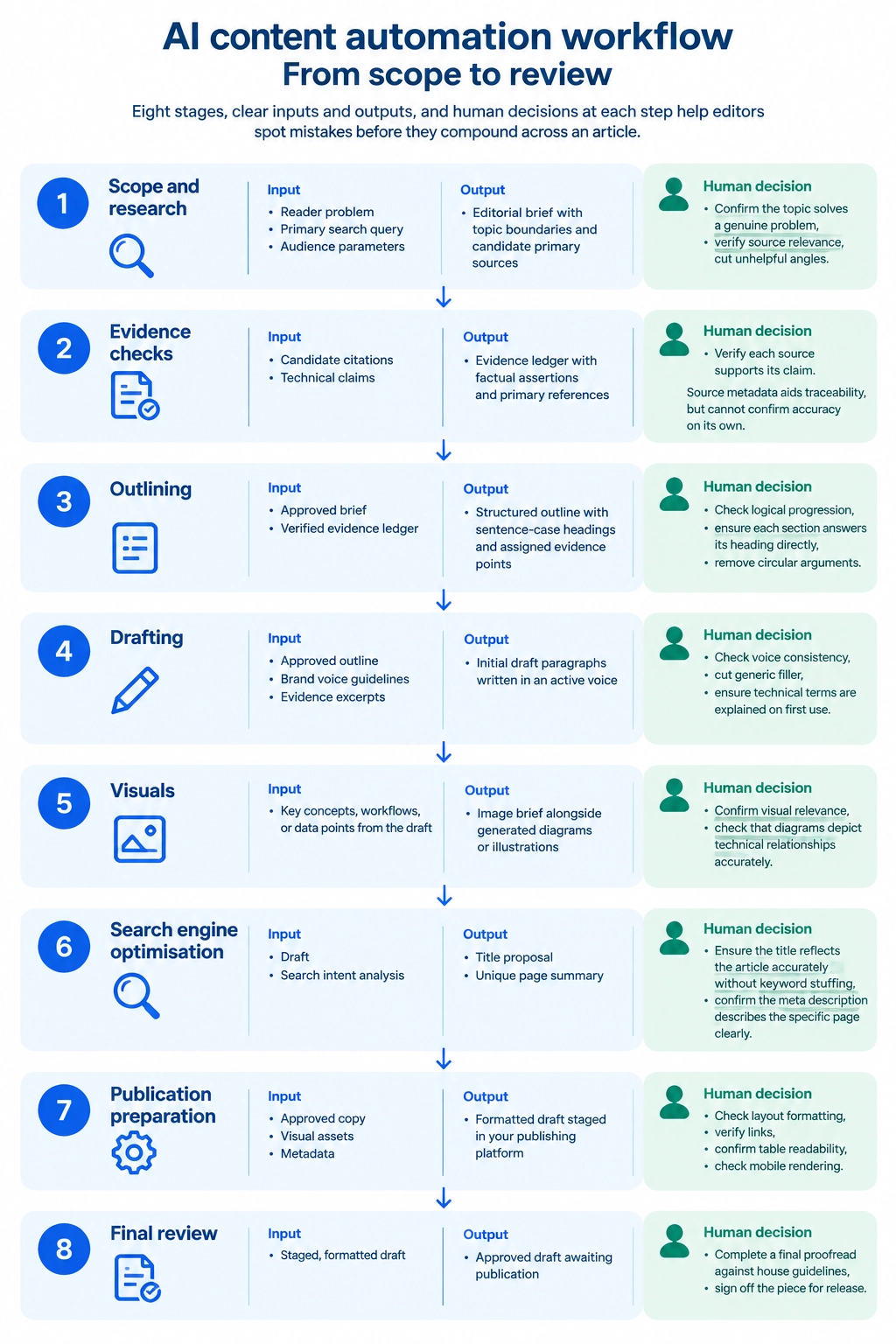
An AI content automation workflow divides production into eight sequential stages, helping editors spot mistakes before they compound across an article. By establishing clear inputs, outputs, and human decisions at each step, small teams can use software assistance while retaining control over publication standards.
- Scope and research. Input: a reader problem, a primary search query, and audience parameters. Output: an editorial brief with topic boundaries and candidate primary sources. Human decision: the editor confirms the topic solves a genuine problem, verifies source relevance, and cuts unhelpful angles.
- Evidence checks. Input: candidate citations and technical claims. Output: an evidence ledger matching factual assertions to primary references. Human decision: the editor verifies that each source supports its claim. Source metadata aids traceability, but it cannot confirm accuracy on its own. Google Cloud documents groundingChunks as source information returned with grounded responses, including web URIs and titles (Google Cloud), and documents groundingSupports as mappings from generated text segments to those groundingChunks (Google Cloud). In my editorial view, these mappings provide useful attribution links rather than independent verification of the truth. An editor must inspect the primary source directly.
- Outlining. Input: the approved brief and verified evidence ledger. Output: a structured outline with sentence-case headings and assigned evidence points. Human decision: the editor checks logical progression, ensures each section answers its heading directly, and removes circular arguments.
- Drafting. Input: the approved outline, brand voice guidelines, and evidence excerpts. Output: initial draft paragraphs written in an active voice. Human decision: the editor checks voice consistency, cuts generic filler, and ensures technical terms are explained on first use.
- Visuals. Input: key concepts, workflows, or data points from the draft. Output: an image brief alongside generated diagrams or illustrations. Human decision: the editor confirms visual relevance and checks that diagrams depict technical relationships accurately.
- Search engine optimisation. Input: the draft and search intent analysis. Output: a concise title proposal and unique page summary. Human decision: the editor ensures the title reflects the article accurately without keyword stuffing, and confirms the meta description describes the specific page clearly.
- Publication preparation. Input: approved copy, visual assets, and metadata. Output: a formatted draft staged in your publishing platform. Human decision: the editor checks layout formatting, verifies links, confirms table readability, and checks mobile rendering.
- Final review. Input: the staged, formatted draft. Output: an approved draft awaiting publication. Human decision: the editor completes a final proofread against house guidelines and signs off the piece for release.
Choosing content automation tools for lean editorial teams
Choosing content automation tools requires matching software functions to specific bottlenecks in your production chain rather than buying all-in-one software suites. Lean editorial teams operate best with a small, modular stack where every tool handles a distinct responsibility that editors can audit easily.
When selecting software, identify the single production step that absorbs the most editorial time. If your team spends hours gathering background documents, a research tool speeds up discovery. If structuring raw notes takes too long, a drafting tool can assemble initial paragraphs around an outline. For visual elements, you can consult my companion guide on creating brand-guided AI infographics to see how to choose diagrams, pass brand colours, and check final output before release. Avoid tools that promise end-to-end publishing without oversight, as automated handoffs introduce errors that require human scrutiny.
The following comparison table outlines the division of labour across common tool categories, highlighting the human checks required to prevent editorial errors.
| Tool category | Useful task | Required input | Human check | Typical failure |
|---|---|---|---|---|
| Research assistant | Locating candidate technical sources | Topic brief and search parameters | Inspect primary sources directly | Plausible citations that do not support the claim |
| Drafting assistant | Generating initial draft paragraphs | Approved outline and evidence notes | Check voice consistency and factual alignment | Repetitive phrasing and unsupported assertions |
| Image generator | Creating conceptual diagrams and illustrations | Detailed image brief and style guide | Verify visual relevance and technical clarity | Visual artefacts and misleading diagram elements |
| Publishing workflow | Staging drafts and formatting layouts | Approved text, visual assets, and metadata | Review styling, links, and responsive layouts | Broken code blocks and stripped formatting tags |
Start with the smallest software stack that solves your immediate problem. Keeping your tools decoupled lets you replace an underperforming model or tool without disrupting your wider editorial process.
Where automated content generation software requires human oversight
Automated content generation software requires direct human oversight because language models generate convincing text without evaluating whether that text is true. A well-constructed sentence or neat data table can make an inaccurate claim look authoritative. NIST AI 600-1 describes confabulation as generative AI presenting erroneous or false content with confidence (NIST). When software presents inaccurate statements persuasively, readers may mistake plausible writing for evidence. For this reason, NIST AI 600-1 notes that organisational use of generative AI may warrant additional human review, tracking, documentation and management oversight (NIST).
Source checking requires a disciplined verification sequence before any draft moves toward publication. First, open the primary source document cited in the draft. Second, locate the specific passage that supports the assertion rather than accepting an automated summary. Third, check the publication date and the scope of the original finding to ensure that historical guidance is not presented as current fact. Finally, separate verified factual evidence from editorial inference. If vendor documentation describes a parameter as experimental, an automated draft must not describe it as an industry standard. To manage this audit trail systematically across complex articles, you can use a structured claim ledger to fact-check AI-generated content before staging your copy.
Unchecked publishing also carries search performance risks. Google Search Central says generating many pages with AI without adding value for users may violate its spam policy on scaled content abuse (Google Search Central). Neat formatting and plausible citations do not prove that a claim is correct. Editors must read every reference, verify each underlying assertion, and take full responsibility for every published sentence.
A worked example of content automation in an editorial test
Content automation delivers dependable results only when you test individual software tasks within clear boundaries. During development tests of my Content Updater application, I examined how separate tasks perform in an editorial environment, observing how software handles data persistence and source retrieval.
In one verified observation, an article-derived image brief was generated by the software, reviewed by me, and submitted to an image generation model through OpenRouter. Following generation, both the revised image brief and the resulting image remained intact after a browser reload. In a separate test using Vertex AI search, the system returned source metadata alongside the generated text.
These limited tests show what software can persist locally and retrieve during single operations. The test confirms that an image and brief survived a single page reload, and that search queries can return source metadata. It does not prove persistence across fresh browser sessions, nor does it demonstrate that every research query returns usable sources. Furthermore, these technical checks do not establish factual accuracy, operational time savings, search ranking improvements, or commercial returns. Automated software serves as a drafting aid, while human editors confirm whether work meets publication standards.
To see how this division of labour works during everyday production, consider the following illustrative example of a lean team producing a technical product tutorial.
In this illustrative scenario, an editorial team plans a tutorial explaining database migration rollbacks. The team feeds the software their primary technical documentation and release notes. The drafting assistant generates an explanation claiming that a configuration flag automatically reverses failed schema migrations. During the evidence check, the editor opens the primary documentation and discovers that the flag only logs errors; manual commands are still required to reverse changes. The editor rewrites the paragraph with the correct syntax, links directly to the official documentation, and flags the correction before staging the draft. This illustrative example demonstrates a realistic division of work, showing where software assists with structuring while an editor protects technical accuracy.
Building editorial review into your content automation plan
An editorial review plan helps ensure that automated drafting supports your publication standards rather than compromising them. Before moving any draft to a live environment, your team should execute a pre-submission checklist to catch errors in tone, data, and layout.
- Primary sources. Confirm that technical claims and policy statements link to an authoritative primary source.
- Figures and dates. Check every numerical figure, date, and fee against the evidence ledger to verify accuracy.
- Voice and spelling. Ensure consistent British English spelling across the piece and cut repetitive phrasing.
- Page titles. Write concise, descriptive page titles while avoiding keyword stuffing and repetitive boilerplate (Google Search Central).
- Meta descriptions. Compose unique meta descriptions that accurately describe each specific page (Google Search Central).
- Headings. Maintain a logical hierarchy of sentence-case headings that answer reader queries directly.
- Descriptive links. Ensure anchor text describes the target resource clearly so readers know where each link leads.
- Image alt text. Provide alt text conveying the visual meaning, using detailed descriptions when visual details carry the core message (W3C WAI).
- Captions. Include informative captions beneath diagrams to explain their relevance to the text.
- Layout and next steps. Review paragraph spacing, verify table formatting, and conclude with a calm, informative next action.
If you publish on Substack or a similar platform, prepare your draft through careful manual staging. Copy verified sections into the editor manually to preserve paragraph styles, embed diagrams, check preview rendering, and send a test email to your editorial team. My testing application does not offer direct upload integrations, so manual formatting checks remain an essential quality safeguard.
As a practical next step, select a single article and run it through this workflow. Record every manual correction your editor makes, identify the single most frequent failure point, and adjust your initial brief or outline before you publish your next piece.
Frequently asked questions
What is meant by content automation?
Content automation refers to using software and structured workflows to research, draft, format, and manage digital articles. Rather than treating an article as unstructured text, teams organise material into small, reusable components that can be updated across multiple channels (Sanity; Sanity). Software handles repetitive formatting and initial drafting, while human editors verify sources and maintain quality standards.
Can you automate content creation entirely?
You cannot automate content creation entirely without risking factual errors and search penalties. Generative models can confabulate, presenting false claims with confidence (NIST), while generating pages without adding value for users may violate search spam rules on scaled content abuse (Google Search Central). Responsible production requires human oversight to inspect primary sources, confirm technical claims, and approve final drafts (NIST).